Invideo AI Review : Is This the Best AI Video Generator for Marketers?
If you’re looking for a faster and more affordable way to create marketing videos, AI tools like Invideo are changing the game.
In this detailed Invideo AI review, we tested its features, pricing, and real-world performance to help you decide whether it’s worth your investment. Impact-Site-Verification: 8f59b336-223f-42ca-acae-e8efe2c5a983
Whether you’re a content creator, marketer, or business owner, this guide will show you exactly what Invideo can (and can’t) do.
What Is Invideo AI?
Invideo AI is an all-in-one AI video generator that turns simple text prompts into fully produced videos.
Instead of manually editing footage, writing scripts, or hiring voice actors, you can:
- Enter an idea or prompt
- Let AI generate the script, visuals, and voiceover
- Edit everything using simple commands
The result? A complete video in minutes.
This makes Invideo especially powerful for:
- Marketing videos
- Social media content
- YouTube automation
- Ads and promotional content
👉 In short, it automates the entire video creation process.
How Invideo AI Works
Here’s a simplified workflow:
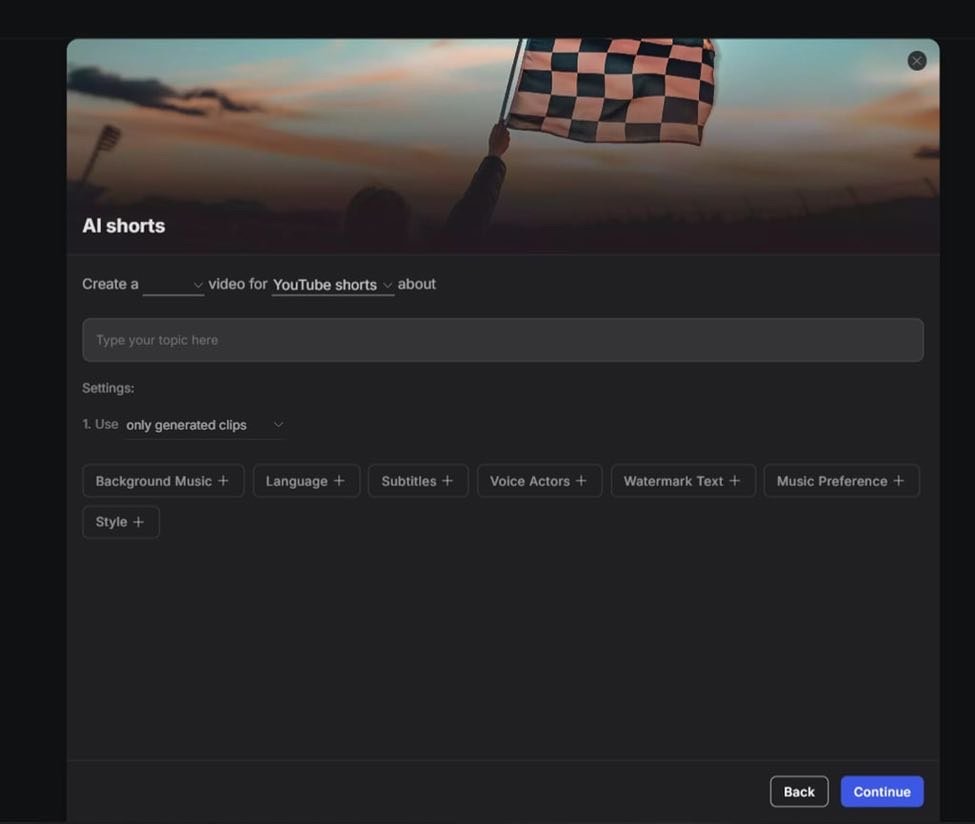
- Enter a text prompt (your idea or topic)
- Choose video style, length, and voice preferences
- The AI generates:
- Script
- Scenes & visuals
- Voiceover
- Customize using prompts (edit scenes, tone, accents, etc.)
This “prompt-to-video” system is what makes Invideo stand out from traditional video tools.
Key Features of Invideo AI
1. AI Video Generation from Text
Invideo allows you to create full videos just by describing your idea.
You don’t need:
- Editing skills
- Expensive software
- A production team
The AI handles everything — from storytelling to visuals.
💡 Use case:
Create YouTube Shorts, ads, or explainer videos in minutes.
2. Realistic AI Voiceovers (50+ Languages)
Invideo includes built-in AI voiceovers with:
- Multiple languages (50+)
- Different tones and accents
- Male and female voices
The voices sound surprisingly natural and match the context well.
⚠️ Limitation:
You can’t directly apply voiceovers to existing videos — you must generate within Invideo first.
3. AI Subtitles & Translation
Invideo automatically adds subtitles and supports multiple languages.
Benefits:
- Better engagement (especially on mute autoplay platforms)
- Wider global reach
- Improved accessibility
You can also customize:
- Fonts
- Styles
- Subtitle effects
Pros and Cons of Invideo AI
✅ Pros
- Beginner-friendly (no editing skills required)
- Saves time and production costs
- All-in-one platform (script + video + voice)
- Great for short-form content (TikTok, Shorts)
- High-quality output for marketing use
❌ Cons
- Output depends heavily on prompt quality
- AI-generated videos can feel generic if not edited
- Limited ability to work with existing videos
Invideo AI Pricing (2026)
Invideo offers flexible pricing depending on your needs.
Free Plan – $0/month
- Limited AI generation time
- Watermarked videos
- Basic features
👉 Best for testing only
Plus Plan – $35/month
- More AI video minutes
- Stock media access
- No watermark
- Voice cloning (limited)
Max Plan – $60/month
- Higher usage limits
- More storage
- More voice cloning options
Generative Plan – $120/month
- Advanced AI generation
- More generative credits
- Designed for heavy users / agencies
💡 Annual billing gives ~20% discount.
Visit Invideo AI Official Website
Who Should Use Invideo AI?
Invideo is best suited for:
- Content creators (YouTube, TikTok)
- Affiliate marketers
- Social media managers
- Small businesses
- Agencies producing ads at scale
If you need fast, scalable video production, this tool is a strong option.
Who Should NOT Use It?
Invideo may not be ideal if you:
- Need full control over professional video editing
- Already use advanced tools like Premiere Pro
- Want to edit existing videos extensively
Final Verdict: Is Invideo Worth It?
Rating: 4/5 ⭐
Invideo AI delivers a powerful combination of:
- Speed
- Simplicity
- Cost-efficiency
It’s not perfect — especially when it comes to customization — but for most marketers, it’s more than enough.
👉 If your goal is to create marketing videos quickly and at scale, Invideo is absolutely worth trying.