Invideo Review: Details, Pricing, & Features
Invideo AI is a smart new tool to help you create videos quickly and affordably, even if you’ve never produced or edited a video before. Whether you’re making video content for work, school, or just for fun, this AI-powered video creation tool makes it easy.
Ideal for marketers, business owners, students, educators, and content creators, Invideo AI doesn’t require any producing or editing experience. To use it, you just need to describe your idea, and Invideo AI brings it to life. With this tool, you can make product promos, explainer videos, and more using a simple, quick, and budget-friendly process.
I teamed up with the Cybernews research team for an in-depth Invideo AI review of its features, pricing, usability, and performance. In this article, you’ll find the inside scoop on what Invideo AI has to offer. Keep reading to find out more.
| Rating: | 4.5★★★★★ |
| Key features: | AI-powered video creation, multi-language support, editing, template library |
| Pricing: | From $28.00/month |
| Free plan: | Yes |
| Best for: | Businesses, content creators, marketers, educators |
Visit Invideo AI
What is Invideo AI?
Powered by Invideo AI 3.0, this platform utilizes generative AI to automate your video production process. You can input a text script or prompt, which the AI uses to generate scenes for your video. The AI also suggests templates, inserts stock media, and applies transitions and effects to minimize your need to edit the video manually.
Invideo also leverages text-to-speech AI technology to create lifelike voiceovers. Of course, you can also manually choose from its large selection of audio and video stock media to further enhance your video output.
Whether you’re creating social media posts, marketing videos, or educational content, Invideo AI streamlines the entire process, making it a go-to tool for anyone looking to produce high-quality videos quickly and effortlessly. The result is a polished, ready-to-share video in just a few clicks, no video editing expertise required.
Pros and cons of Invideo AI
Things I like
- User-friendly interface
- Massive template library
- AI-powered editing
- HD exports without watermarks
- Affordable pricing
- Stock media access
- Multi-language support
Things I don’t like
- Limited advanced editing
- Custom animation limitations
- No offline editing
Key features of Invideo AI
Invideo AI offers a wide range of features, including AI-powered video creation, an extensive template library, a media library, text-to-video feature, and multi-language support. Let’s take a look at each of these features in more detail below.
AI-powered video creation
Invideo AI is a game-changer if you want to turn a simple script into a professional video in mere minutes. All you need to do is import your script. Invideo AI automatically creates scenes, selects the right media, and adds smooth transitions, making it perfect for anyone needing quick content.
Extensive template library
With over 5,000 templates, Invideo AI effortlessly creates videos for virtually any purpose. No matter what you’re producing – social media ads, educational videos, or corporate presentations – there’s a template for it. Because the templates are highly customizable, you can fine-tune them to fit your brand’s style, tone, and message. With so many template options, you no longer need to start from scratch.
Media library (stock photos, videos, music)
Invideo AI has a vast built-in media library that makes it easy to access high-quality media. You can create high-quality videos with free stock photos and music with a simple click. This makes Invideo save you both time and money and still helps you make professional content.
Text-to-video feature
Invideo AI offers a text-to-video for content marketers or educators who want to create engaging video content from written material. It allows you to take a blog post, article, or script and turn it into a video with voice-overs, animations, and relevant visuals. The AI reads and analyzes the text to create the final video.
Multi-language support
Invideo AI helps create content for a global audience. The platform supports multiple languages, making localization a breeze. Whether you’re expanding your brand or educating an international audience, the ability to create videos in various languages gives you the flexibility to reach people from different regionsI especially recommend this for businesses aiming to grow their presence worldwide.
Is Invideo right for you?
Invideo is a great fit for you if you want to make videos without learning how to film shots or use video editing software. By using AI for video creation, you cut down on the time and budget that would have been used for filming, production, and editing.
This AI video creation tool is ideal for content creators running their own social media pages or marketers and business owners who need video content for their brand. Teachers and students alike can also use Invideo to create video presentations and e-learning content.
Invideo plans and pricing
Invideo AI offers flexible pricing plans: Free, Plus, Max, and Generative. All four plans are designed to suit different video creation needs, using advanced AI-powered tools.
Though there’s no Invideo free trial, the Free plan offers a robust suite of video editing tools, including over 5,000 templates, a standard media library, AI script generation, and text-to-speech narration. It can create videos up to 15 minutes long and has 1GB of cloud storage. However, it has limitations, such as watermarks and no HD exports.
You can also upgrade to the Invideo AI Plus plan, priced at $28.00/month. This package offers longer video durations, HD exports, watermark-free videos, 100GB of cloud storage, and premium media from iStock.
If you plan to use the tool as an agency or high-volume video producer, opt for the Max Plan, which costs $50.00/month and includes unlimited exports and 400GB of cloud storage.
Finally, the Generative plan, priced at $100.00/month, offers 200 minutes per month of AI generation and up to 15 million Generative Credits, perfect for highly customized videos.
| Free | Plus | Max | Generative | |
| Pricing | $0/month | $28.00/month | $50.00/month | $100.00/month |
| Unlimited exports | ❌ No | ✅ Yes | ✅ Yes | ✅ Yes |
| Standard Media | ✅ Yes | ✅ Yes | ✅ Yes | ✅ Yes |
| Generative credits | ❌ No | ✅ Yes | ✅ Yes | ✅ Yes |
| iStock | ❌ No | ✅ Yes | ✅ Yes | ✅ Yes |
| Voice clones | ❌ No | ✅ Yes | ✅ Yes | ✅ Yes |
Check Invideo AI pricing
Invideo AI: user experience
Invideo AI offers a smooth and beginner-friendly user experience. The dashboard is intuitive, with clear navigation and helpful tools. Then there’s the drag-and-drop functionality, which makes the process even simpler by allowing users to drag in media, text, and templates and add to finetune their projects.
Video editing on this platform is efficient, as Invideo renders high-quality videos in a very short period. AI features enhance your editing experience by adding transition automations and script summaries.
However, while it boasts simplicity, users on Reddit and Trustpilot reported experiencing minor slowdowns when making more complex edits or longer videos. This was especially true when adding multiple layers of media or complex transitions. But despite this, Invideo AI remains generally reliable and responsive, keeping most users’ experience unbothered.
How to create a video using Invideo
If you’re ready to take your video editing skills to the next level, using Invideo AI is fast and easy. Here’s how to do it:
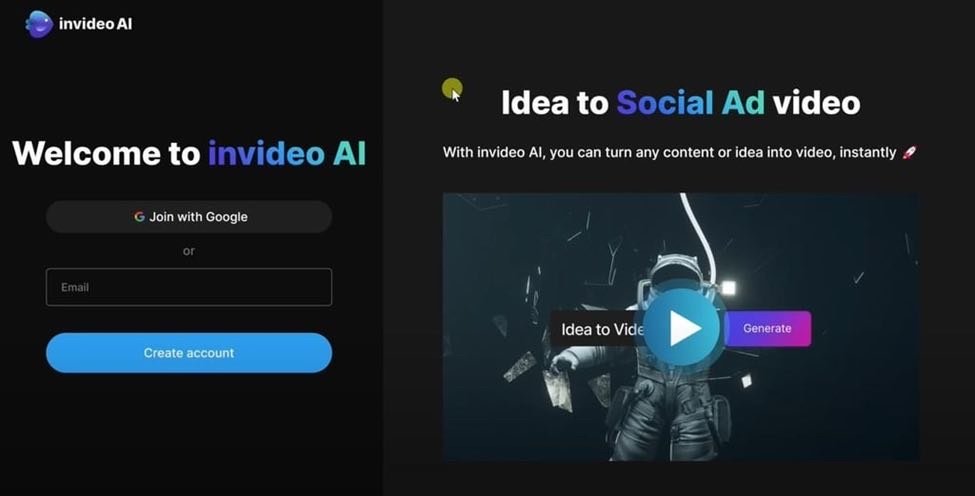
- Go to the Invideo AI website and click the Sign Up button on the homepage.
- Choose from various pre-designed templates or make a new one from scratch. Add a prompt that will help AI find the right assets and generate the correct video for you.
- Paste your text script into the AI-powered editor, which will automatically generate scenes and visuals.
For an all-in-one editing solution, I highly recommend Invideo AI and its ability to create professional-quality videos. All you need is a script, and Invideo AI will assist you with the rest. Choose from over 7,000 templates and a 16-million stock media library, and enjoy the AI-assisted video editor.
Sites like Invideo AI can make video editing a quick and easy process, though Invideo stands out for its beginner-friendly experience. This tool is ideal for content creators, marketers, and small business owners who need a budget-friendly and efficient method of producing video content.
Whether you’re new to making videos or an expert at video editing, Invideo AI offers the flexibility and resources you need to consistently produce high-quality content.
- Use the timeline editor to work with text, audio, and transitions.
- After editing, click Preview to watch your video before it’s finalized, then choose your export quality options – 720p, 1080p, or 4K, depending on your subscription plan.
For an all-in-one editing solution, I highly recommend Invideo AI and its ability to create professional-quality videos. All you need is a script, and Invideo AI will assist you with the rest. Choose from over 7,000 templates and a 16-million stock media library, and enjoy the AI-assisted video editor.
Sites like Invideo AI can make video editing a quick and easy process, though Invideo stands out for its beginner-friendly experience. This tool is ideal for content creators, marketers, and small business owners who need a budget-friendly and efficient method of producing video content.
Whether you’re new to making videos or an expert at video editing, Invideo AI offers the flexibility and resources you need to consistently produce high-quality content.
FAQ
Is Invideo AI free to use?
Yes, Invideo AI is free to use but has some limitations. The free PlanPlan includes watermarked videos and restricts certain features, such as export quality and access to premium media libraries. Users can create videos with customizable templates, AI-powered tools like script generation, and limited cloud storage.
Is Invideo AI easy to use for beginners?
Yes, Invideo AI is designed with beginners in mind. You don’t need any prior video editing experience to get started. The platform only requires a script to get started on generating scenes, adding relevant visuals, and including transitions.
Can I customize Invideo AI videos?
Yes, Invideo AI offers a wide range of customization options. After the AI generates a video, you can easily adjust the visuals, text, audio, colors, and layout to match your brand or personal style.
Will Invideo AI save me time if I make content often?
Yes, Invideo AI speeds up the video creation process. Instead of spending hours filming and editing, you can create a complete video in just a few minutes. This is ideal for bulk video creation, such as for brand social media pages.
Can I use Invideo AI for commercial purposes?
Yes, Invideo AI can be used commercially, but this is only available through paid plans. When you upgrade to the Business or Unlimited plans, you gain access to watermark-free videos, which are perfect for promotional materials, social media campaigns, advertisements, and other commercial applications.